


Lumen’s authentication isn’t really complicated, but you can’t just glance at it and get it either. The reason: it carries the original sin of being a subsystem of Laravel. Everything, from the docs to the code, has been heavily trimmed down — trimmed so much that you can’t make out the full picture without going back to read Laravel’s code (compare Lumen’s config/auth.php with Laravel’s config/auth.php).
If you came to Lumen directly instead of through Laravel, then when you hit a problem or want to add a feature, your moves are pretty much: check the official docs → search the web → dig through the source. And the official docs are vague, the web results are a blur, and digging through the source is hard too — there are abstraction layers, and (compared to Laravel) not enough information in the code. So the whole thing gets difficult, and it takes a lot of extra effort to piece the architecture together.
That’s exactly why I’m writing this series: to help other pure-Lumen developers get the full picture faster and take fewer wrong turns.
The config file mystery
To understand how authentication is managed in Lumen, the config file is a good place to start — but the one we want is Laravel’s config/auth.php. It’s almost identical to Lumen’s in its options and parameters, yet it gives you far more complete information.
The defaults when auth is enabled
'defaults' => [
  'guard' => 'web',
  'passwords' => 'users',
],
The first block in the config file defines the system’s default guard, named web, and the default password-reset module, users (passwords are out of scope for this series).
The guard settings
'guards' => [
  'web' => [
    'driver' => 'session',
    'provider' => 'users',
  ],
  'api' => [
    'driver' => 'token',
    'provider' => 'users',
  ],
],
The next block is where the guards are actually registered. There are two by default:
- The guard named
web, driven by the session driver running a SessionGuard, with theusersmodule as its user-object provider. - The guard named
api, driven by the token driver running a TokenGuard, with theusersmodule as its user-object provider.
The user-object provider modules
'providers' => [
  'users' => [
    'driver' => 'eloquent',
    'model' => App\User::class,
  ],
  // 'users' => [
  //     'driver' => 'database',
  //     'table' => 'users',
  // ],
],
The block after that registers the user-object provider modules. Counting the commented-out one, there are two:
users, a module driven by the eloquent driver running Eloquent.- Or a module driven by the database driver, connecting to the database directly.
As for the other settings under driver (like model or table), those are custom parameters for each driver — you can ignore them for now.
Back to Lumen
Now that we’ve seen Laravel’s config file, let’s look back at what’s in Lumen’s config/auth.php:
'defaults' => [
  'guard' => env('AUTH_GUARD', 'api'),
],

'guards' => [
  'api' => ['driver' => 'api'],
],

'providers' => [
  //
],
Seriously stripped-down, isn’t it?
Compared to Laravel, the only addition is a call that pulls the guard assignment from the .env file (and defaults to the guard named api).
One thing worth noting: even though Lumen sets 'driver' => 'api', there’s actually no such thing as an ApiGuard in the system. What the api driver drives is a lightly customized version built on RequestGuard. A bit confusing? That’s fine — we’ll walk through it piece by piece later.
Quick recap
From the two config files, we can get a rough sense of the roles involved:
- Named Guard: a guard called xxx, made up of a driver and a provider.
- Guard Driver: the driver behind the actual guard.
- Named Provider: a provider (user provider) called xxx, made up of a driver and other parameters.
- Provider Driver: the driver behind the actual user provider.
The basic authentication architecture
From the config walkthrough above, we can draw a relationship diagram like this.
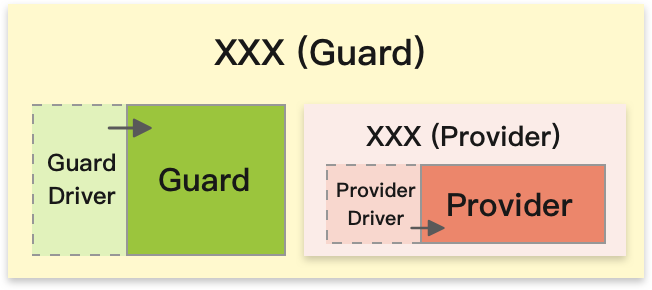
When an XXX guard is configured and enabled, it uses a GuardDriver to drive some Guard, and the identity checks and related work happen inside that guard. On top of that, the XXX guard itself defines an XXX provider, and uses the assigned ProviderDriver to drive some UserProvider.
So how does this XXX guard actually get used within the architecture? Let me add the two key players — the ones before and after it — to the diagram.
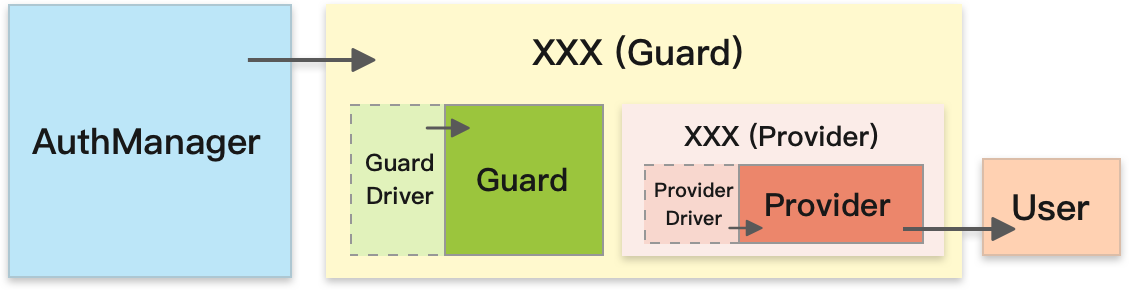
In practice, Lumen goes through the AuthManager to get a usable Guard + User combination and make its authentication decisions. And which guards and users are available is defined and governed in config/auth.php. So whenever you add a custom Guard / Driver / Provider, always remember to add the matching settings to the config file — otherwise the system can’t use your custom pieces properly.
Wrapping up
By this point the full shape of the architecture is almost in view. As for how the objects under it work in practice, and how the flow runs in detail — we’ll go deeper into these roles and interface types in the next post.